HP announced that some of its most popular calculators will be available as software applications on PCs, iPhones and iPod touch devices.
HP 12c and 12c Platinum software are exact replicas of the original calculators that millions of business professionals and students use. The software is built with the same algorithms and calculation sequences and has the identical layout and functions as the originals. The Platinum version of the industry-standard HP12c adds the choice of time-saving Reverse Polish notation or traditional algebraic data entry as well as convenient editing features such as “backspace” and “undo” keys.
Ideal for engineering professionals, teachers and science students and professionals who already use the HP 35s Scientific Calculator, the software version offers quick, accurate answers from the PC. The software offers the identical HP 35s calculator layout and functionality and provides quick results to scientific and engineering calculations. The software was developed by HP, recipient of the IEEE Milestone in Engineering for the original HP-35. The HP 35s software also offers more than one hundred built-in functions, HP Solve where the user can store an equation, then use it to solve for any variable and the ability to copy and paste calculations directly into financial documents.
Designed for business professionals and students, the software version of the HP 20b Business Consultant is identical to the calculator. It is designed to be a convenient tool for finance, business, and real estate functions. The large two-line display enables the user to view up to 12 digits and scroll through variables, detailed real-text labels, menus and worksheets, and prompts as well as copy and paste answers into other documents.
The HP 15C application, designed for iPhone and iPod touch, replicates the original calculator’s layout, functions, algorithms and calculation sequences. Used by college students and career people alike, the programmable HP 15C was revolutionary when it was introduced in the 1980s. Like the hardware version, the software application provides an array of matrix calculations plus complex functions and a Solve key that finds the root of an equation.
The HP 35s application for iPhone and iPod touch is available on the iTunes App Store. Software for the HP 20b and 15C is available at www.hp.com/buy/calculators. Software versions of the HP 12c and 12c Platinum are available on both sites. Most of the software is available now on the iTunes App Store and through HP at prices starting at $9.99.(1) The 12c Platinum solution is expected to be available in late summer.
Sunday, June 28, 2009


Philips launches PowerSensor LCD monitor
Philips introduces the Brilliance LCD monitor that comes with the PowerSensor, infrared presence sensor, that can detect whether you are sitting in front of it. The 22-inch display will lower its brightness to cut power consumption by 50%, if its sensor finds no one is using the display.
 Philips Brilliance 22-inch LCD features 1680×1050 resolution, 1000:1 contrast ratio and a 5ms response time. It offers VGA and DVI inputs. It operates independently of the PC and OS, so it'll work with anything you plug into it. It'll be available in July and cost £170.
 Philips Brilliance 22-inch LCD features 1680×1050 resolution, 1000:1 contrast ratio and a 5ms response time. It offers VGA and DVI inputs. It operates independently of the PC and OS, so it'll work with anything you plug into it. It'll be available in July and cost £170.
Saturday, June 27, 2009
Download Android 1.5 NDK
As is well known for the Android software development is in Java. The package is the appropriate SDK for plugin development environment Eclipse. There is an emulator device that greatly helps in the design. On the other hand, the use of Java does not allow developers to take advantage of the operating system created based on Linux. This issue is designed to solve the Android NDK.
Developers have access to Android Native Development Kit - set of tools to use in implementing the application of origin (native) functions of the system and the code in the languages C, C + +.
NDK provides:
Developers have access to Android Native Development Kit - set of tools to use in implementing the application of origin (native) functions of the system and the code in the languages C, C + +.
NDK provides:
- set of tools and build-files to compile libraries of code in C and C + +
- opportunity to integrate native libraries into an application (application packages files,. apks), which can be deployed on the Android-devices
- packet header file (. h) and libraries that will be supported in releases Android, starting with the documentation, examples and manuals for version 1.5
- libc, the standard C library
- libm, the standard library of mathematical functions
- zlib, a standard ZLib compression library
- JNI (Java Native Interface), the interface interaction between Java c code created specifically for the OS
How to create an Access database from templates
Office Access 2007 includes a packet of binary stand-alone database applications. I usually use the templates to start a project on MS Access. With a template, you will not have to start from scratch - you have something to work from the beginning.
The trick is to find the right model that fit your needs. Usually, the models are good enough for the basic needs of generic data. In some cases, a little fine-tuning is initiated following the customer needs.
To start using MS Access, below are the steps to create a new Access file from templates. First click N to create a new access file, then choose the model categories. The models include some interesting patterns that you choose.
Choose a model that fits your needs. In the following example, I chose "Contacts" so that I can show you how to customize a database of contacts.
Give your file a name followed by defaults, it will be named after the model type. Click the Create button to create the file access.
The database should appear. You will see an Excel spreadsheet as an interface where you can make transactions such as adding a new contact entry.
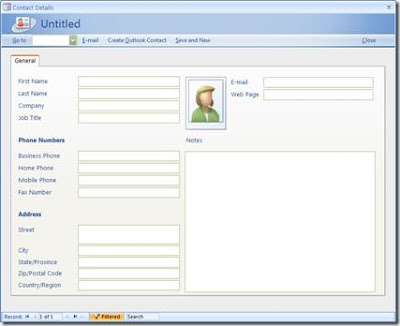
If you click the button to add a new contact, it will open a new contact form where you can type in a contact detail.
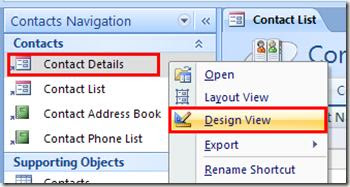
 Now, if you need this update to the form layout and labels? It's simple, just right click on the name of the form to the left, then choose Design View:
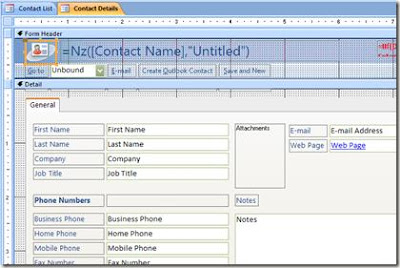
With design, you can update the form of presentation and content.
You can also access an object from the design table to change the fields in the table. The example below is the contact with the table:
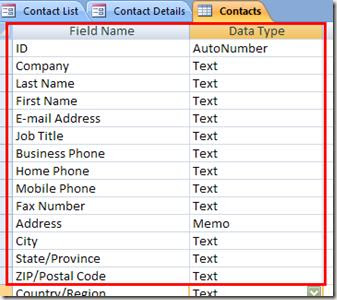
Here you May all fields with their data types. Be sure to use the appropriate data type for a field or you could end the inefficient file access. For example, use only the memory data type if you know that the area will take longer than usual one line of text, like addresses or messages.
Also, set the right field depending on the size, the maximum number of characters you'd expect on land. Do not use 100 characters for a field of e-mail.
I hope this short introduction to access models that you started with your small projects focused on the data. In future messages I'll show you how to display data from Access into a Web page using PHP.
The trick is to find the right model that fit your needs. Usually, the models are good enough for the basic needs of generic data. In some cases, a little fine-tuning is initiated following the customer needs.
To start using MS Access, below are the steps to create a new Access file from templates. First click N to create a new access file, then choose the model categories. The models include some interesting patterns that you choose.
Choose a model that fits your needs. In the following example, I chose "Contacts" so that I can show you how to customize a database of contacts.
Give your file a name followed by defaults, it will be named after the model type. Click the Create button to create the file access.
The database should appear. You will see an Excel spreadsheet as an interface where you can make transactions such as adding a new contact entry.
If you click the button to add a new contact, it will open a new contact form where you can type in a contact detail.
 Now, if you need this update to the form layout and labels? It's simple, just right click on the name of the form to the left, then choose Design View:
With design, you can update the form of presentation and content.

You can also access an object from the design table to change the fields in the table. The example below is the contact with the table:

Here you May all fields with their data types. Be sure to use the appropriate data type for a field or you could end the inefficient file access. For example, use only the memory data type if you know that the area will take longer than usual one line of text, like addresses or messages.
Also, set the right field depending on the size, the maximum number of characters you'd expect on land. Do not use 100 characters for a field of e-mail.
I hope this short introduction to access models that you started with your small projects focused on the data. In future messages I'll show you how to display data from Access into a Web page using PHP.
Subscribe to:
Posts (Atom)